Fixing Artificial Intelligence
Lee Dean
How do I turn my AI logo into a vector?
The machines may take over one day, but for now, there is an increasing demand for production-ready files.
Either certain AI programs can’t produce them, or the people writing the prompts don’t know what to ask for. I suspect the latter, but I have asked several AI platforms to output a vector file. The AI bot/agents usually TELL ME HOW to make one, but they cannot generate them. I’ve seen one exception, maybe, but I’ve literally forgotten which platform it was. If I remember, I won’t publish it out of self-preservation. Take that Skynet.
Frequently, I am seeing freelance project descriptions along these lines:
“Vectorized Logo and Branding Guidelines
Summary:
We are seeking a skilled designer to create a vectorized logo and comprehensive branding guidelines for our café’s new image. The ideal candidate will have experience in logo design and branding, with a strong portfolio showcasing previous work. The project involves developing a unique and memorable logo that reflects our brand identity, along with detailed guidelines for consistent application across all platforms.”
That sort of thing is perfect for Logo Hammer. Bring it on.
Most people Google phrases like these:
- “printer says my logo needs to be vector what does that mean”
- “how to make a vector file for printing”
- “what is a vector version of a logo”
- “how do I turn my AI logo into a vector”
- “how to save logo as vector”
- “how to fix blurry logo for printing”
- “convert png to vector free”
- “how to make my logo high resolution”
- “how to vector a logo in Canva” (Very common, though Canva cannot auto-trace)
- “how to make a vector file in Photoshop”
- “free online vector converter”
The last one is tricky. As I was researching for this article, I found a few bitmap to vector sites. I dropped in one of my bitmapped logos to see what the site would do. The preview looked pretty good, but I didn’t see the final output because I refused to pay for it. Try it and tell me what you got. lee@logohammer.com.
What is going on in the world of AI right now?
The client typically provides an AI generated logo in the form of a .png or .jpeg file. Those are “bitmapped” files, meaning they are made of pixels. Anything made of pixels has a limited enlargement ceiling, before pixels start becoming visible. The ceiling is about 200% of the original. These can look great on screen, but when you need a business card—or a huge sign—it becomes problematic.
If the generated file is 500 pixels or larger, you can get away with it for certain applications, like on a website or maybe business cards. That COULD take care of the resolution, but the output will be RGB mode. RGB stands for red, green and blue. This is how light makes up colors. The computer monitor on which you are reading this is RGB. So far, so good. But what about printing it on signs and business cards? For that, you need CMYK color mode. CMYK stands for cyan, magenta, yellow and black. It’s essentially how your own toner or ink-based office printer works. It’s the same for digital or offset printing. Theoretically, all you need is CMY, but black turns to muddy brown in the real world, so black is added to prevent that.
There is also spot color which, in the USA, that typically means PANTONE Matching System or PMS for short. Spot colors are kind of like paint. They are premixed and are separate from CMYK inks but can be used with them. I don’t think AI can produce files with spot color—certainly not if it can’t even produce CMYK files.
Sometimes, the provided bitmap looks decent, and the client is in love with it, because they gave birth to it—metaphorically speaking. Therefore, they want a vectorized version with no deviation from their original. I’ve done just that many times.
Another example of my recent projects is when the client can’t quite get their love child to cooperate via AI prompts, and they quit out of frustration. They then come to someone like me, who can finalize their vision, and export a production-ready set of files. Sometimes they ask for concept and/or design improvements as well. I’m always happy to do that.
The last pertinent example I’ve seen is where the client uses AI as a basis for concepts. In the current state of AI, this may be the best use case for it. Over the years, many people have said to me “I’m a visual person; I can’t tell you what I want, but I know what I like when I see it.” This is the exact opposite of a visual person. But I know what they mean. This is very common. What it means in practical terms for the designer is a lot of iterations before the client finally “sees” what they like. AI concepting can reduce a lot of wasted time in this respect, as the client has already iterated themselves before coming to the designer. If they have narrowed it down to two or three ideas, that’s ideal.
Clients are learning
The most recent trend I’ve seen, are clients who need vector logos, but apparently have had designers output a “traced” vector file. So, they ask for a “hand-drawn” vectorization. I do this a lot. But I’ve also used the trace function and then I clean up the trace.
I suspect when a client asks for this “hand-drawn” vectorization, there was no clean up, as the traced files often have unwanted artifacts (pieces or shapes that are unsightly or unneeded). The client has received a “dirty” file, and I suspect they don’t know it until they take it to a printer and the image setter throws an error. An image setter is a specific combination of computer software and hardware used to make printing plates. It can handle a lot of garbage, but there are limits. Many times traced files have duplicate shapes, one on top of the other. Sometimes it doesn’t matter, but often these will slow down or crash the image setter. Aside from duplicate shapes, the trace can make extremely complex shapes that will cause a crash.
If you know what you are doing, and are ethical, this is easily avoided. Cleaning up a trace on a complex logo is usually faster than hand-drawing it.
And another thing.
I recently saw such a request for an extremely complex logo, where there were four farm animals surrounded by the farm’s name inside a border. It was all in an old-fashioned engraved style, like you see on currency. This means there were literally hundreds—if not thousands—of shapes to draw. Had I bid on the job, there would have had to be a clear understanding of the hours needed for such a project.
How can you tell if a file is a vector or not?
Usually, the file’s extension is a good clue. As I say in my glossary under Vector, “Typical extensions for vector files are “.ai”, “.eps” and “.svg”. This is important to note: Importing/inserting a bitmap file into Illustrator or vector formats does not MAKE it a vector file. For instance, dropping a JPEG into Adobe Illustrator or Adobe Acrobat file, is still a JPEG in a vector wrapper. Sometimes this is attempted in order to satisfy the extension preference, [demanded by the printer], but it does not convert the original bitmap.” So you are back to square one after wasting time.
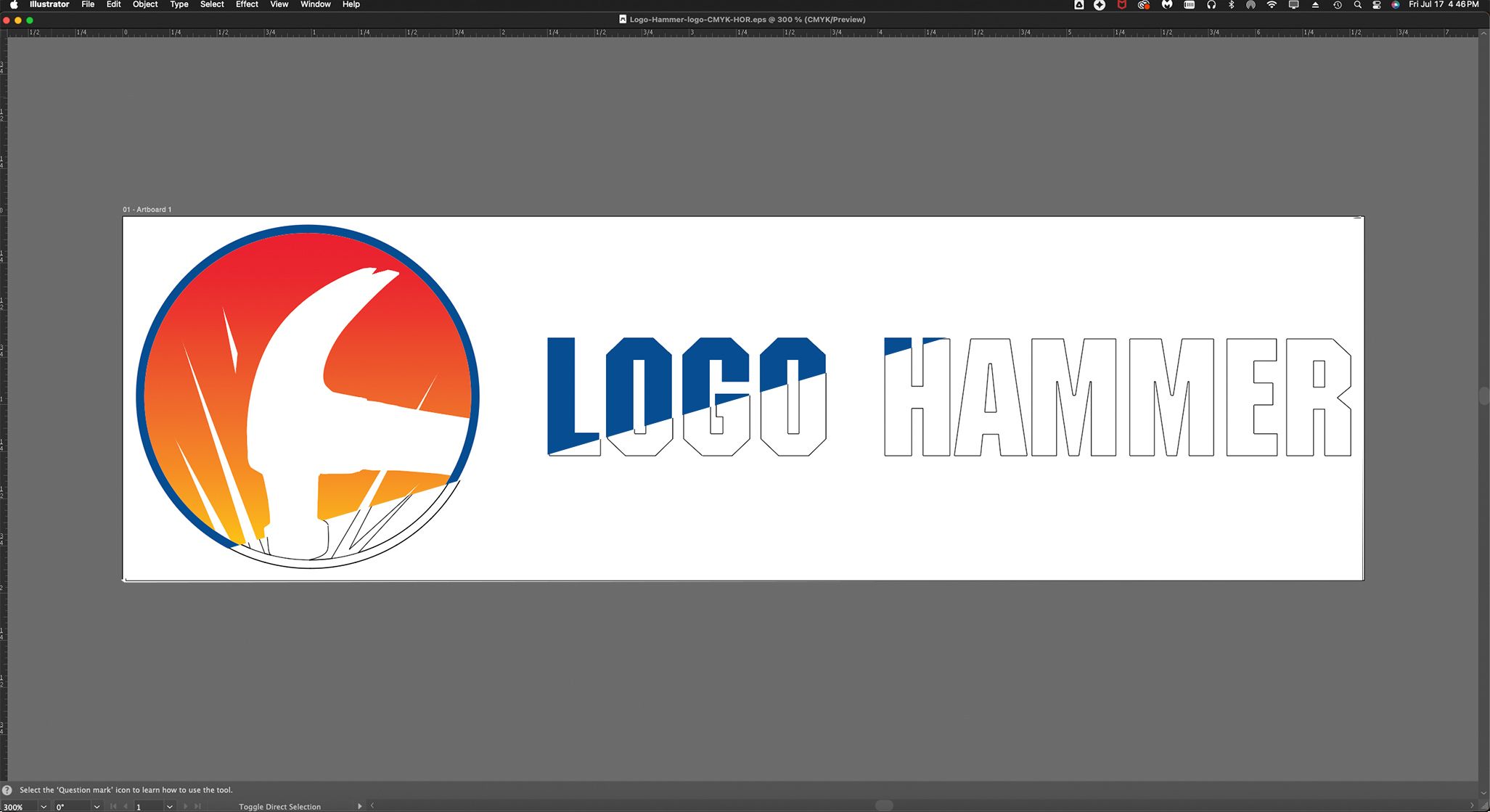
Whatever the client furnishes, I open it up in Illustrator. Illustrator has two critical views for this purpose. A true vector file will show the outlines of shapes (also called paths), in black and white, in the “Outline” view. In this view, if a bitmap has been dropped in, only a white box will show up.
See the picture for this article as it demonstrates the views in a cutaway/composite image. The color part is called the “preview” view. I have artificially cut across the image diagonally to show the “outline” view, which shows the shapes in Illustrator.
You may be asking to yourself, “Is he anti-AI, or an AI snob?”. Not at all. I have used AI for images where none exist. I just created an AI video for a fashion client.
My rant on my homepage notwithstanding, I use the most effective tools I can find. I just haven’t tried to use AI to create a logo yet. Yet. We’ll see. In any case, as with images, I’ll be using my own creativity, whether it’s with a paintbrush, a mouse, or with prompts.